Late last week palmOne released another software update for the Treo 600. So far, it's available for SprintPCS subscribers only. Either they care the most about us Sprintians, or they think that we will make good guinea pigs, and therefore they care the least about us.
The things I really care about in update 1.20:
- More reliable audio
Hmmm, that was a really short list. I'm hoping that the PocketTunes MP3 player has fewer audio dropouts with the upgrade. I currently get dropouts every couple of songs at random.
The things I might care about in update 1.20:
- POP3 client now in ROM (Assuming this saves memory and makes it faster)
- Support for message priority on inbound and outbound SMS messages (I don't get enough messages a day right now to care about sorting on priority)
- Playback of voice memos received via PictureMail service (Assuming I run into someone else some day who uses Sprint's PictureMail service)
My wife has the Powerbook in San Antonio and my work laptop with Windows obviously went away when I stopped working at Avaya, so I can't check out the upgarde until my wife comes back tomorrow. It would be nice if palmOne supported a cross-platform installer so I could install it from the Linux box I am currently using, but I guess that is too much too ask for.
A new review of the Treo 600 showed up on the O'Reilly Network site recently. This review is especially useful if you:
- Live in Canada
- Own a Treo 180 and are thinking about upgrading
- Want to sync your Treo to a Mac
- And/or are looking for a broad description, with screenshots, of the basic features of the Treo 600
Overall, I think the review does a pretty good job of describing the basics of the Treo 600. I like that he included a bunch of anecdotes about oddities, problems, or cool features that he happened on. A lot of reviews that I read are almost indistinguishable from corporate press releases.
I'm sure Success BBQ sounded like a good name for a restaurant when they opened the place. The barbed wire fence now surrounding the entire building suggests otherwise.
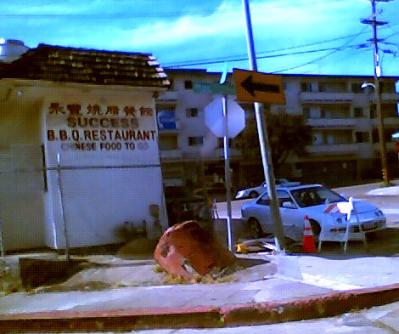
I took this photo with the camera on my Treo 600 while my wife was driving down the street. I've gotten a bit better at extracting acceptable photos from the camera. After adjusting the contrast and cropping the photo a bit, I scaled it down to about 400 pixels wide. The images start at 640x480. Scaling the photos from the Treo camera down in size using a good image manipulation program (like the GIMP) is almost always a good idea.
The first thing you need to do to learn how to get good photos from your Treo 600's camera is to read this article at wireless-doc.com. Lighting, lighting, lighting.
And if you still don't believe you can get decent photos from the camera, check out his portfolio of photos taken with it. I wouldn't have believed it if I hadn't slowly been getting better and better photos from my Treo 600.
The next thing you need to do is download QSet. QSet lets you set the compression factor that the Treo software uses. The default is 65. If you bump it up to 90, you will often get significantly better photos. The photos will take up more space, but it's a small price to pay. With the Q set at 90, my photos are usually about 65 KB each. With a Q of 65, they averaged about 45 KB.
Timing is key. Since the Treo doesn't have a flash to illuminate the scene, the software gets very aggressive about boosting the gain. In low light situations, I've noticed that when I switch to the camera, the image starts out very dark. After about five seconds, the brightness and contrast start looking okay. But, after about ten seconds (the exact timing depends on the light level), the infamous blue pixels start appearing near the edges, and sometimes dance across the whole screen. The problem is that the Treo software has boosted the gain so high that the signal is clipping. Apparently they made the max value a blue pixel instead of a white pixel. Otherwise, it would look like snow.
So, what you need to do is get the time right between when you switch to the camera and when you snap the photo. That's a hassle, but it's usually an issue only in low-light situations. Obviously, you also need to hold the Treo as still as possible when taking photos, especially when indoors.
Of course, you shouldn't waste too much time trying to use it indoors. What can you expect from a tiny camera with fixed focus, no flash, and no manual settings to control the gain? But if you are outdoors with moderate lighting, you can take some surprisingly acceptable photos.
For my needs and tastes, the Treo 600 is a far better PDA phone than any other Palm, Pocket PC, Windows Mobile, Symbian, etc. device I've checked out. But of course, there are still a couple things that bother me or I wish had been better implemented. Although this might look like a long list, that's mainly because the Treo has so many features. A lot of these issues don't even apply to most other phones, because the other phones are so lacking to begin with. I would generally rather have a 95% perfect, and useful, feature, than not have the feature at all. If Palm One/Handspring added all these features, the phone would likely cost even more, weigh more, and have worse battery life. But I reserve the right to ask for them, anyway.
- The camera is terrible. Lots of digital noise in images. Very low contrast. Update 2/11/04: It's not as bad as I thought.
- Lo-res screen (only 160x160, but at least it is very readable, even in bright daylight, and it doesn't apear to be a huge drain on battery life)
- Some MIDI ringtones are too quiet, even on max volume
- Weak vibrate mode
- Using headphones for MP3 playback requires an extra, and not included, adapter
- No built-in support for voice dialing
- No voice recording
- Location of the SD card slot causes the card to often pop out when I take the phone out of my pocket
- I can't figure out how to easily drop a call when another call comes in, so I end up leaving my voicemail on hold (which eats up minutes) while taking a call that comes in while I'm checking voicemail
- No external LED to indicate waiting voicemail and/or SMS Update: Check out $6 add-on Treo Butler.
- No removable battery
- Java runtime environment not pre-installed and integrated
- No always-on LCD with a clock, like many flip phones have
- Selecting text requires use of the stylus Update: Check out $10 add-on TreoSelecText
With my previous cellphone, I had the option of buying a $100 data kit from Sprint that would let me use the phone essentially as a modem. I didn't spend a lot of time investigating this option, since it sounded like a lot of hassle for what would have been a really slow connection that chewed up a lot of airtime minutes.
A friend (thanks, Paul!) recently tipped me off to PdaNet from the June Fabrics PDA Technology Group. PdaNet lets your Treo function as a wireless data connection for your laptop. Unfortunately, your laptop has to be running Windows. After downloading the .prc file and syncing it onto my Treo, I was browsing the web almost immediately from my laptop (with WiFi radio turned off and no Ethernet cable attached, of course).
If you have a Treo 600 and a laptop running Windows, it's a very well-spent $34. They offer a 15-day free trial so you can make sure it works for you before you buy it.
Treo 600 users need version 2.5.2, which came out less than a week ago. So far, it has worked flawlessly for me. At one point I got an error dialog on the Treo saying something like "Error: Serial: port in use (0x0307)", but the dialog disappeared within a few seconds and I continued browsing as if nothing had happened. The FAQ explains that this is due to a conflict with the Sprint PCS Business Connection software when it tries to auto-connect and synchronize email and documents.
When PdaNet connected, it claimed that it had negotiated a 145 kbps connection. I tried the bandwidth meter at 2wire.com and got speeds of 107.8, 130.2, 99.9, 90.3, 90.5, and 79.9 kbps. During the tests, the signal strength on the phone stayed pretty constant at two bars.
I was even able to connect to my corporate LAN through our Avaya VPNRemote software as easily as if I were using a wired or wireless connection on my home LAN. Outlook was even slower than usual, but it was still better than over a dial-up connection. The 2wire bandwidth meter indicated speeds of 59.8 and 83.7 kbps over the VPN. Not bad, considering the overhead of the VPN encryption and the additional path through my company's routers before getting to 2wire's website.
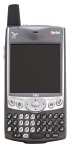
Until I get a lot better at typing on the Treo 600's mini keyboard, I think I'll leave most of my posting for a regular keyboard on a regular computer. I certainly won't be writing the next War and Peace on the Treo keyboard. It is a mighty fine machine, though.
The photo to the left is unlikely to be actual size, unless you are using a very low resolution screen. The actual size in inches is 2.36 x 4.41 x 0.87 (width x height x thickness).
After roughly a day of usage, here are my initial comments:
It passes the pocket test. I was worried it would be too bulky, but it fits just fine. No belt strap-ons for me.
The alarm tone and other built-in tones are short and very pleasant sounding. Every time I hear the shrill bee-dee, bee-dee, bee-dee alarm tones screaming out from an older Palm device, I want to drive hot, sharpened pencils into the ... okay, it's not that bad, but it's pretty annoying. The Treo comes with a much nicer set of built-in tones.
It's not the best phone for quick dialing. While I like having access to all my contacts synced from Outlook, I almost never call probably 95% of the contacts in my addressbook. The numbers are there just in case. The "first initial then last name" search cabaility is good, but it's too many buttons to press. I definitely need to figure out the bookmarks/speed-dialing thing quick. Either that or pay for Sprint PCS Voice Command, since the Treo doesn't have built-in voice dialing.
It's the big screen or nothing. My wife's Samsung S-105 flip phone has a nice, albeit small, color screen on the inside and a simple mono screen on the outside. The mono screen doesn;t draw much power, so it is always on. The Treo doesn't offer that option. Therefore, you have to turn on the main screen if you want to know the time, see the signal strength, see if I have voice messages, etc.
The phone gets excellent signal strength on the Sprint network. My old phone was a Sanyo SCP-4000. The Treo 600 gets a significantly better signal on the Sprint network than the Sanyo did. On my drive to work, the Sanyo sometimes dropped calls and often had a really tinny sound when the signal was weak. I used the Treo on a conference call during my drive to work this morning, and the sound was flawless the entire time.
If you have a Clie, don't upgrade the Sony and Palm software with the Treo software. Lots of the programs that come with the Clie work only with the Clie. I ended up having to delete nearly ten programs off my Treo after the initial sync.
The Blazer web browser is awesome.
